InputFX. Effects. On your input.
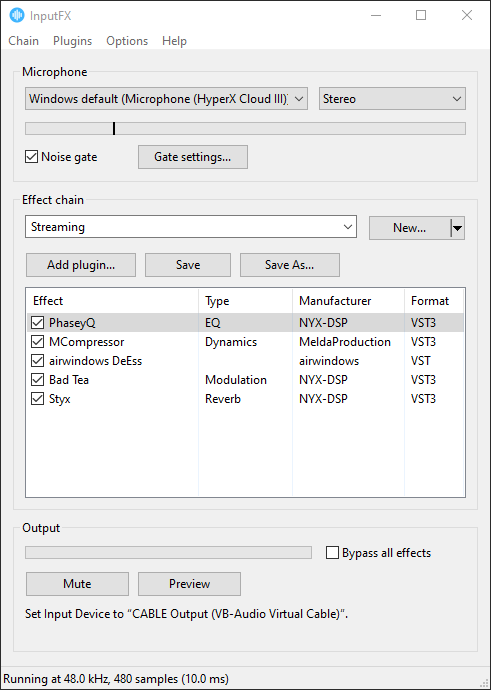
Run your mic through a chain of VST effects and send the result to Discord, OBS, or anything else that takes a microphone. Lightweight, no frills, just simple functionality.
Whether you need a polished vocal chain for streaming or a flexible platform for live sound design, InputFX offers a VST host with zero fuss. Utilise standard tools like EQs, compressors, and the built-in noise gate to cut out keyboard clicks and ensure vocal clarity during calls. Alternatively, you can drop in pitch shifters and other effects to completely mangle your audio in real time for gaming, voice acting, or just terrifying your grandmother.
Version 1.0.1, free. For Windows 10 and 11 (64-bit).
Needs VB-Audio Virtual Cable (donate what you want).
How it connects
- MicrophoneYour headset or USB mic
 InputFXAdd your effects
- VB-CableA free virtual audio cable
- DiscordOr OBS, Zoom, Teams, a game
Since Windows natively prevents programs from acting as microphones, InputFX outputs to a VB-Audio Virtual Cable that Discord or other apps then use as their input device. This leaves your physical microphone completely unaltered and available for other apps to use normally.
Setup
- Install VB-Audio Virtual Cable and restart your PC. InputFX tells you if it can't find it.
- Run InputFX, pick your microphone, and click Add plugin... to build a chain.
- In Discord, go to Voice & Video and set Input Device to CABLE Output (VB-Audio Virtual Cable). Other apps work the same way.
Questions
Does it work with apps other than Discord?
Yes. Anything that lets you choose a microphone can use it: OBS, Zoom, Teams, Steam, or a game's own voice chat. Pick CABLE Output (VB-Audio Virtual Cable) as the input device.
How do I hear what I sound like?
Click Preview. It plays your processed voice through your headphones. You can choose where it plays in Options > Settings.
I hear crackles or dropouts.
Open Options > Settings and pick a higher latency. Lower latency is more responsive but works your CPU harder, and some plugins need more headroom than others.
Windows says it protected my PC.
InputFX isn't code-signed yet, so SmartScreen doesn't recognise it. Click More info, then Run anyway.
Can I use 32-bit plugins?
No. InputFX is a 64-bit program and can only load 64-bit plugins.
Where are my chains saved?
In %APPDATA%\InputFX\Chains, each in its own file.
Is there a Mac version?
No, InputFX is Windows only. On a Mac, Apple's free AU Lab can serve the same purpose.